
Everything you need to know to create a strong GitHub profile
GitHub is more than just a platform for hosting code—it's an essential tool for developers to showcase their skills, collaborate with others, and contribute to the open-source community. For entry-level developers, having a polished GitHub profile can make a strong impression on potential employers. This article outlines the key elements to include in a professional GitHub profile to enhance your visibility and appeal to recruiters and hiring managers.
1. Complete and Professional Profile Information
Profile Picture
- Use a professional, high-quality headshot.
- Ensure that the photo is clear and reflects your professionalism.
Bio
- Write a concise, engaging bio that highlights your skills, areas of interest, and what you’re looking for in a role.
- Example: "Aspiring full-stack developer with a passion for creating intuitive web applications. Proficient in JavaScript, React, and Node.js. Looking for opportunities to grow in a collaborative environment."
Location
- Include your current city and country. This helps recruiters know where you’re based or if you’re open to remote opportunities.
Contact Information
- Add a professional email address.
- Link to your LinkedIn profile, personal website, or portfolio if applicable.
Pinned Repositories
- Pin 3-6 repositories that showcase your best work or most relevant projects. These should demonstrate your coding skills, problem-solving abilities, and familiarity with relevant technologies.
2. Consistent Commit History
- Regular Commits: Make consistent and frequent commits to demonstrate continuous progress. Avoid making large commits that bundle numerous changes together, as this can make it difficult to track specific changes or debug issues later.
- Descriptive Commit Messages: Use clear and descriptive commit messages that explain the purpose of the change. This practice not only helps others understand your work but also demonstrates your attention to detail.
- Structured Workflow: Follow a structured commit workflow, such as using feature branches for new features and separate branches for bug fixes. Consistent use of branches shows your understanding of version control best practices.
Strong Commit History Example: 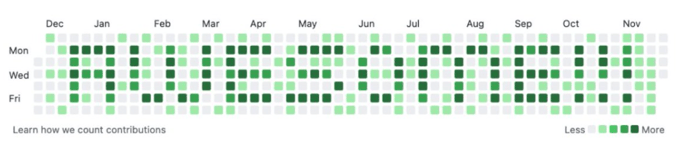
This person is far more likely to get an interview and land the job because they appear to be engaged in active development work. They are also likely to be more prepared for coding challenges and technical interviews because they never stopped working.
Weak Commit History Example:
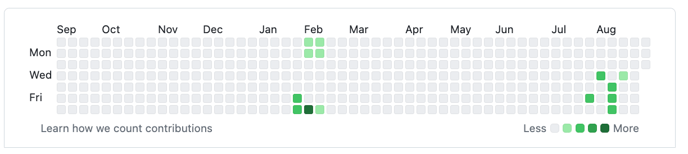
This person will be perceived as a much weaker candidate for development positions because there are significant gaps in their commit history. Eventually gaps can be explained by industry experience, but right now, you must maintain consistent commits to be a strong candidate.
3. High-Quality Repositories
Project Selection
- Include projects that highlight your core competencies. For example, if you’re a web developer, pin a full-stack web application, a front-end project, and a back-end project.
- Ensure each project is complete, with no unfinished features or broken links.
Documentation
- Write clear README files for each repository. A good README should include:
- Project Title
- Description: What the project does and why it’s important.
- Installation Instructions: How to set up and run the project locally.
- Usage: Examples or screenshots demonstrating the project in action.
- Technologies Used: List the main technologies and tools.
- Features: Highlight key features and functionalities.
- Contributing: If open to contributions, explain how others can contribute.
Commits and Branching
- Make regular, meaningful commits with descriptive messages.
- Use branches effectively to manage features, bug fixes, and releases. Merge branches only after code reviews or testing.
Code Quality
- Ensure that your code is clean, well-organized, and follows best practices.
- Use consistent naming conventions, indentations, and comment your code where necessary.
4. Contributions to Open Source (Bonus Points!)
Contributing to Other Projects
- Participate in open-source projects by submitting pull requests, reporting issues, or providing feedback.
- Engage in communities related to your area of interest.
Personal Open Source Projects
- Consider starting your own open-source projects. Even small utilities or libraries can showcase your initiative and expertise.
Activity
- Maintain regular activity on GitHub. This includes making commits, opening issues, and participating in discussions. An active profile signals to employers that you’re continuously learning and contributing
5. Showcase Learning and Growth
Learning Repositories
- Create repositories where you experiment with new technologies or document your learning journey. This could include coding challenges, tutorials you’ve followed, or notes on concepts you’re mastering.
Projects with Iterative Development
- Show projects that have evolved over time. Highlight the improvements and additional features you’ve added since the initial version.
6. Personal Branding
Consistent Naming
- Use a consistent naming convention for your repositories, such as
project-name,learning-xyz, orportfolio-2024. - Note: You will not name your project "project-name." Instead, you will come up with unique names and use those. For example, if your are building something called "Mac-Man" to practice a new language, you would name the repository "mac-man-learning."
Profile Consistency
- Ensure your GitHub profile is consistent with your resume, LinkedIn, and any other professional profiles. The same projects, technologies, and keywords should be reflected across all platforms.
Showcase Testimonials or Collaborations
- If you’ve collaborated with others on a project, mention it in the README or bio. This can highlight your ability to work in a team environment.
Conclusion
A well-curated GitHub profile is a powerful tool for entry-level developers to demonstrate their abilities and potential to employers. By focusing on quality, documentation, and active contributions, you can create a professional GitHub profile that stands out. Keep your profile updated and continuously seek opportunities to showcase your growth as a developer.